
iPhone Reception in Australia
In Australia, iPhones often achieve higher real-world speeds than budget Android devices on the same provider, while top Samsung models can outperform iPhones in high capacity 5G zones. Differences depend on the carrier, tower load, and distance from the cell. For example, speeds may vary from 10 Mbps in low coverage areas to a 500 Mbps on strong 5G band.
Reports from AU users feedback point to the same causes: slow band switching on fringe of ISP towers, congestion in busy areas, incorrect carrier settings after SIM or eSIM activation, worn SIM cards, and occasional instability when using 5G Auto in weak coverage zones.
Fixes that may work
- Reset Network Settings: Settings > General > Transfer or Reset > Reset > Reset Network Settings.
- Update Carrier Settings: Settings > General > About, wait for prompt.
- Toggle Voice and Data from 5G Auto to 4G for stability in weak areas.
- Reinsert SIM or request a new SIM at a carrier store if older than two years.
- Disable Private Relay temporarily if the mobile internet speed drops.
- Force a better band by toggling Airplane mode to refresh tower handshake.
- Test reception with another carrier SIM to rule out local tower problems.
How to fix app-related reception issues
Apps can also interfere with reception. VPN, antivirus apps with network scanning, parental and privacy filters can slow or block data, causing the phone to appear as if it has poor signal.
- Disable or pause any VPN app and retest speed.
- Turn off or remove antivirus apps that inspect network traffic.
- Disable data saver or firewall apps that filter or block connections.
- Check battery optimisation settings and allow full background access if needed.
- Restart the phone after disabling or uninstalling network-filtering apps.
- Update all apps and retest reception.
Background
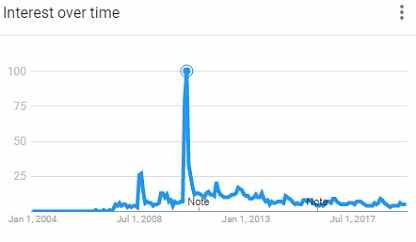
In 2010 that only six days after the iPhone 4 launch, two US users filed a lawsuit claiming the antenna design caused dropped calls and weak signal. Consumer Reports also declined to recommend the phone after tests showed it could lose reception when held in a certain way.
Current iPhones
Current iPhones no longer suffer from the iPhone 4 antenna issue. Modern models have far better antenna design, multiple internal antennas, and stronger band support for Australian networks. Today, reception problems are usually caused by network settings, SIM issues, or local tower conditions rather than hardware faults.
Tags: mobiles